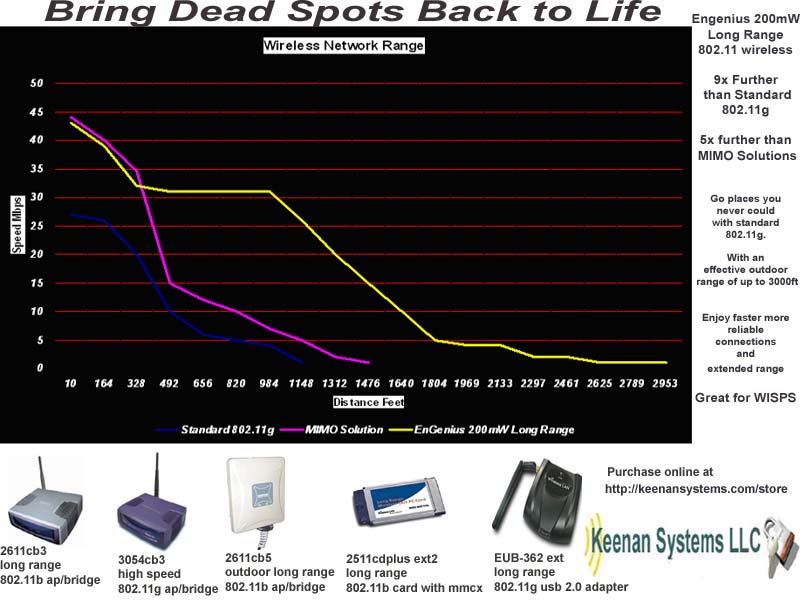
EnGenius / Senao Wi-Fi FAQ
We're and amazon associate powered website that brings you the best Wi-Fi and tech products from across Amazon.
also check out the TP-LINK travel router here great for frequent travelers
CLICK HERE TO PURCHASE ENGENIUS PRODUCTS
Q: how do I get support for my EnGenius device?
A: If you purchased your device from us you can get direct support from EnGenius at 888-735-7888. If there is a problem with your device you can email support@EnGeniustech.com and they will repair or replace it for 1 year from purchase.
Q: What web browsers can I use to configure the EnGenius ECB3500, EOC-2610, EOC1650, EOC / ECB-3220, EOC / ECB-8610S
A: If possible use Microsoft Internet Explorer 6+ however we have tested Safari 3.2 and Firefox 3.0 and they will also work there might be some irregularities in text formatting or menus.
Q: Why do I need to use WiFi access points can't I just use multiple low cost routers?
A: The wireless interface on a router is designed for home use and only a few users (2-3) when you put into a environment with many users it will quickly lock up. Access Points Like the ECB3500 are designed for business environments with many users up to 25. If you need more range or capacity you can add additional access points as needed. You can use router like the esr9850 for your Internet just disable the wireless interface and connect your access points to the wired switch ports.
Q: I want to use a Engenius eoc-2610/ eoc2611p / 1650 / 3220 to connect to a access point in a mobile application Boat / RV etc.
A: You want to use the client router configuration on your device we have instructions below.
eoc-2610 / 1650 bridge router config
Q: I have questions about the EOC-2610 or EOC2611p
A: We have a thread here answering many questions.
Q: Can I run DD-WRT on my EnGenius device?
A: Yes on some of them we have information here
Q: My EOC/ECB-8610s does not seen to be broadcasting in AP mode.
A: Your 8610s might be in 802.11a mode so your 802.11bg clients will not be able to see it. From the wireless menu select 802.11g then select bg mode from the dropdown click save and reboot. You are now in bg mode and the AP will be visible to all.
Q: I set my ECB-3500 to AP router mode and can not longer connect to the ethernet port.
A: When you switch to AP router mode the ethernet port becomes the WAN port and blocks administration. You will need to connect to the SSID EnGenius with a wireless client to manage the device in this mode.
Some USB to serial converters may not work with the procedures below it is best to use a desktop with 9 pin serial port if possible. We have verified that this serial converter works.
Q: How do I reset the EOC-3610S-EXT / EOC-8610EXT / EOC-8610S-EXT back to factory default settings?
A: click here for the reset procedure
Q:
How do I reset the EOC-3220 / EOC-3220 EXT / EOC-3220+ back to factory default
settings?
A: An RS-232 null
modem serial cable is required for this procedure
you can
purchase one here
1. Connect the EOC-3220 to your computer with a null modem serial cable.
2. Start a HyperTerminal session: Click Start and then select Programs ->
Accessories -> Communications -> HyperTerminal.
3. After the HyperTerminal window appears:
a. Give this new connection a name. Ex: EOC-3220.
b. Select correct COM port. Ex:COM1.
c. Set baud rate as "38400", data bits "8", parity "none", stop bits "1", and
flow control as "None". Then press “OK” to bring up the HyperTerminal window.
d. unplug the power on the POE injector wait 5 seconds and
plug it back in.
4. Wait until the "#" is displayed in the HyperTerminal window.
5. Type "flash reset", then hit enter.
6. Type "reboot", then hit enter. After the device reboots, all settings will be
at factory default.
Q: Does the EUB-362 work in Linux.
A: It will work using the ndiswrapper see the howto here
Q: What are the longest range adapters?
A: The EUB9603H and the EPI-3601S are the longest range..
In our experience the EUB9603H 802.11bgn USB adapter has the best range range with 600mW and -96dBm. It works with 802.11b g and n networks and has a large 5dBi detachable antenna. Out in the open you can get range of up to 1 mile with the stock antenna or 3 miles with the 8.5dBI omni. The EUB9603H also has a virtual Access Point mode that will create a hotspot around your computer for other devices to connect to and share the remote Internet connection. The EUB9603H has drivers for windows and Apple MAC. You can purchase one here
The EPI-3601S PCI card also has the good range with 600mW of power and -95dBm receive sensitivity. You can purchase one here
You can also use high powered client bridge with a computer having a ethernet connection no drivers are required so any OS will work.
Q:
When will a high power 802.11abg adapter be
available with external antenna leads?
A: We have a 300mW
802.11a/b/g Cardbus card here.
Q: Do you have a high power 802.11abg client adapter with a fixed antenna?
A: Yes the EUB-862 has up to 200mW and supports 802.11abg
Q: What chipset does the 2511cd plus use?
A: It uses the prism 2.5 chipset and works with netstumbler, and remote exploit auditor. Beware some are selling the 100mW prism 3.0 mercury card which does not work with auditor and has much shorter range.
Q: does the 2511cd plus ext2 have a built in antenna?
A: no it requires a clip on or external antenna with pigtail. On the 2511 CD PLUS EXT2 with external antenna leads there is a 'main' and 'aux' antenna lead. Hold the card with the PCMCIA connector part pointing to the right, the top of the card facing you (with the light on top), the main antenna is the one on the bottom. You only need to attach ONE antenna to this card to have it work properly. The second antenna lead (auxilliary) is only needed if you want to support receive diversity.
Q: does the 2511cd plus have antenna connectors?
A: no it has a built in 2dBi antenna and no connectors it is best for use in a laptop because external antennas can break off the ext2 card.
Q: should I use the 2511cd plus in a desktop?
A: you can with a pcmcia bridge but you are better off using the EUB-362 USB adapter or the EPI-3601S PCI adapter
Q: is the 2511cd plus and ext2 supported under linux
A: yes, wlanng and hostap driver work.
Q: will the 2511cd plus and ext2 work with remote exploit auditor?
A: yes, the card is supported but your laptop might not be you will have to try different versions of auditor and see what works with your hardware.
Q: will the eub-362, 2511cd plus, 5354cb, 2054cb frisbee work with netstumbler?
A: yes, the cards with work using the ndis driver. You must select the ndis driver from netstumblers adapter menu.
Q: My
computer appears to have installed a Spanish driver. What happened?
If you find your computer has installed the spanish Red Inalambrica ADSL branded
drivers, you have Automatic Update turned on. Here is the solution:
Symptom: Configuration utility language changes to Spanish once driver and card
are installed and system is rebooted.
A:
This is a Windows Update Issue. When plugged in to an internet network
connection, Windows Update automatically searches for the "correct" drivers for
the hardware that is installed (i.e. the wireless network card). Even if the
drivers have already been installed from the cd, Windows Update seems to replace
those drivers with new ones. These drivers are the ones that change the
configuration utility language to Spanish.
Q: what drivers should I use for the cards?
A: use the drivers on the disk they are the best available do not use drivers from the EnGenius or Senao website they might not work.
Q: will my EnGenius bridge work with any 802.11 access point?
A: yes, in client bridge mode they act just like any other standard 802.11 client.
Q My ECB / EOC 3220 does not seem to have the range I expected.
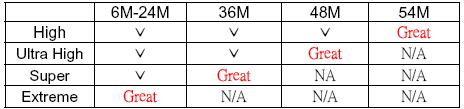
A: This device has adjustable power output and ships in the lowest setting high. To increase the power output to 400mW go to wireless advanced setting and change output power level to extreme.
Q I can not select a higher power level on my ECB / EOC 3220 in AP mode.
A: Power output is limited by data rate by the FCC.
The following table shows the possible power levels.
Q Why is the WLAN light is not lit on my ECB-3220 in ap mode?
A: The WLAN light will only comes on once a client has associated this way you know when the wireless network is in use.
Q What are the POE requirements for the ECB-3220
A: The ECB-3220 is 802.3af compatible and requires a 48v injector here. The injector does not need to support 802.3.af but it must be 48v.
Q: what is the longest range access point / client bridge?
The ECB-8610S here has 600mW of transmit power and -95dBm receive sensitivity it currently has the best range over 50 percent better than the ecb-3220.
The ECB-3220 here has 400mW output and receive sensitivity -94bBM (the 400mW is only achieved in 802.11b mode). The 3220 series has the most developed firmware with many features.
The 2611cb3 here with the high output 200mW and receive sensitivity -95dbm they have the 2511cdplus ext2 card inside.
even though they are only 802.11b they are still good for outdoor long range over a long distance because only 802.11b data rates will be useable.
802.11bg bridges are best for indoor use where the higher data rates will be available 802.11b only bridges are lower cost and can be used in long range applications.
Q: What units support support repeater?
A: The ECB/EOC-3220 units have WDS repeater and universal wireless repeater (with separate SSID for repeater) modes.
The ECB/ EOC 8610S and 3610s have WDS repeater.
The ECB3500 units have WDS repeater and universal wireless repeater (with sames SSID)
The EAP3660 has WDS repeater
The EAP9550 has WDS repeater
The EAP300 has WDS repeater
The EOC2611P has WDS repeater
The ENH200 and ENH200 EXT have WDS repeater
Q: How do I configure repeater modes.
A:
With WDS repeater function you must use the same units and configure the MAC address under WDS
With universal wireless repeater you can connect to any make model 802.11 access point.
Here is a guide on how to set up WDS repeater
Here is a guide on how to set up Universal Wireless Repeater
Q: why should I not use repeating?
A: it reduces bandwidth by 1/2 for every hop and increases latency. you must locate the repeater within 50% signal range for a good connection. In most cases it is best to use a wired access point instead.
Q: is there updated firmware for my unit?
A: use the firmware shipped with your device if you think you need to update call EnGenius support first EnGenius at wlan@EnGeniustech.com or 888-735-7888 x517 do not download and update firmware unless you know what you are doing you could destroy your device and void the warranty.
Q: My 2611CB3 is acting funny how can I reset it to the factory defaults?
A:
First check you power cube make sure it is set to 110v they ship at 230v
remove power from the cb3
press and hold reset button
apply power
wait for 8 seconds
release reset.
Q: My new ECB-8610S is making a ticking sound.
A: This is normal the sound will go away in 24 hours or unit warms up and does not affect operation.
Q:
How do I reset the eoc-2610, eoc-5610, eoc-1650,
ecb3500 or eap-3660 to factory default.
A:
hold reset while you apply
power release reset after 60 seconds.
Q: How do I reset my ECB-8610S / ECB-3610S?
A: remove power
from the unit
press and hold reset button
apply power
wait for 10 seconds
release reset.
If the unit was in ap mode it will default to 192.168.1.2 if it was in CB mode it will be 192.168.1.1
Q: How do I reset my ECB-3220 to the factory defaults.
A:
plug in the power
wait for 30 seconds ( for the device to load Linux )
push in the reset button and hold for 10 seconds.
The unit will default to the bridge mode and ip address of 192.168.1.1
you may have to repeat this process several times .
If you can not access the 192.168.1.1 address after several resets try pinging the broadcast address of 192.168.1.255 you should get a reply from the actual ip.
Q: What is the default ip address of my ECB-3220
A: The default ip address in bridge mode is 192.168.1.1 and in ap mode 192.168.1.2 If you do a hard reset it will default back to bridge mode and 192.168.1.1
Q: What are the non overlapping 802.11channels. Why do I need to use them?
A You can only run a limited number of access points in one area. You must select non overlapping channels you will have reduced throughput dropped connections and other problems. Here are the channels you can use at the same time.
2.4Ghz 802.11bg and 802.11n 20Mhz non overlapping channels 1 6 and 11
40Mhz 802.11n or super g channel 6
5.8Ghz 80211a and 802.11n 20Mhz non overlapping channels for indoor use 7 12 34 40 183 185 189 196
40Mhz 802.11n or super a 7 34 183 189
Q: Are high powered WLAN products dangerous?
A: High powered LAN products radiate very little power compared to other everyday devices.
A 600mW access point is only generating .6W or 6/10 of a watt by comparison a cellphone that you hold to you head can have between .75W and 1W of power. A bag phone or CB radio can have 4W of power. A nightlight bulb uses 3W of power or 3000mW.
That said you should properly use high gain antennas and stay within the FCC limits for EIRP.
CLICK HERE TO PURCHASE ENGENIUS PRODUCTS