Here is a link to the Lectron adapter https://amzn.to/3YNvA6N It is a great alternative to a teslatap! This will not work with a tesla supercharger it will work with a wall connector home charger or destination charger at a hotel or business. Here is a link to the tow hook straps https://amzn.to/3GdYULp
Tesla myQ Chamberlain Smart Garage Control Integration Setup and Review
You will need the myQ Wi-Fi hub here https://amzn.to/3Zls57V And a strong 2.4Ghz Wi-Fi signal you can use a ECW336 AP https://bit.ly/3Q1ojeX
Control your garage door with apple carplay and homekit using MyQ Home Bridge or home assistant
Here is the MyQ Home Bridge it will work with just about any garage door opener and will add it to apple homekit without any additional hardware or programming. https://amzn.to/3CZcpxx If you are running home assistant you can use the myQ Smart Garage Control and add a homekit integration this is what I am using https://amzn.to/3GTUU2G
How to program the BroadLink RM4 pro IR and RF Universal Remote to work with 433Mhz blinds
Here is the broadlink RM4 remote https://amzn.to/3JgW9vP Here are the yoolax 433Mhz blinds that I have https://amzn.to/3XKSSJv
SV3C Outdoor 3MP POE IP Security Surveillance Camera Review with working Blue Iris configuration
I will demo this camera and show you how to set it up in Blue Iris ( make sure to click find / inspect after you put in the camera setting I show it will scan the camera and put in the correct url ) More info about the camera here https://amzn.to/3ReczXK POE Standard: 48V-52V (IEEE 802.3af/at standard) Here is a great PoE switch you an use with the camera https://www.keenansystems.com/store/catalog/product_info.php?products_id=584
Govee WiFi Water Sensor review with auto water main shutoff using home assistant and home bridge
Here are the Govee WiFi Water Sensors https://amzn.to/3wGFKJC Here is the Dome Automatic Main Water Shut-Off Valve Controller https://amzn.to/3wN53cM Here is the home bridge plugin I am using http://bit.ly/40bxaQt
tech product post
Apple watch ultra ESG510 Router shipping! ECS5512F FIBER Ruckus AP’s in stock! VLAN export
Apple watch ultra ESG510 Router shipping! ECS5512F FIBER Ruckus AP’s in stock! VLAN export We have the ESG510 router / security gateway available here https://bit.ly/3QPIzzx The ECS5512F 12-Port 10 Gigabit SFP+ switch is in stock here https://bit.ly/3umuiSm We have Ruckus AP’s in stock here https://bit.ly/3uVsoZf
Rivian Confirmed, ECS5512F Fiber Switch Shipping, ESG510 Security Gateway Client VPN Testing
The ECS5512F is now shipping more info here https://bit.ly/3umuiSm I wrote this blog post on client VPN configuration with the ESG510 here https://bit.ly/3F98BLB More info on the ESG510 https://bit.ly/3QPIzzx
Windows VPN Client Configuration for ESG510 using Shrew VPN Client
Although windows has a built in VPN client it frequently is not working due to updates you can use the free shrew soft VPN client with the ESG510.
9.3 VPN Client using Shrew VPN Client on Windows 10 as an example
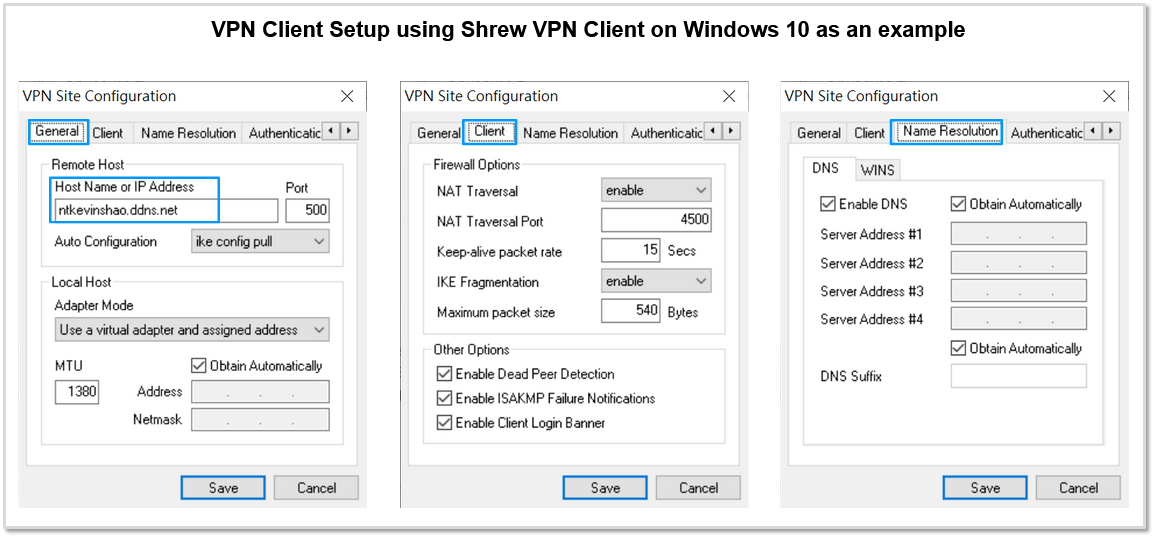
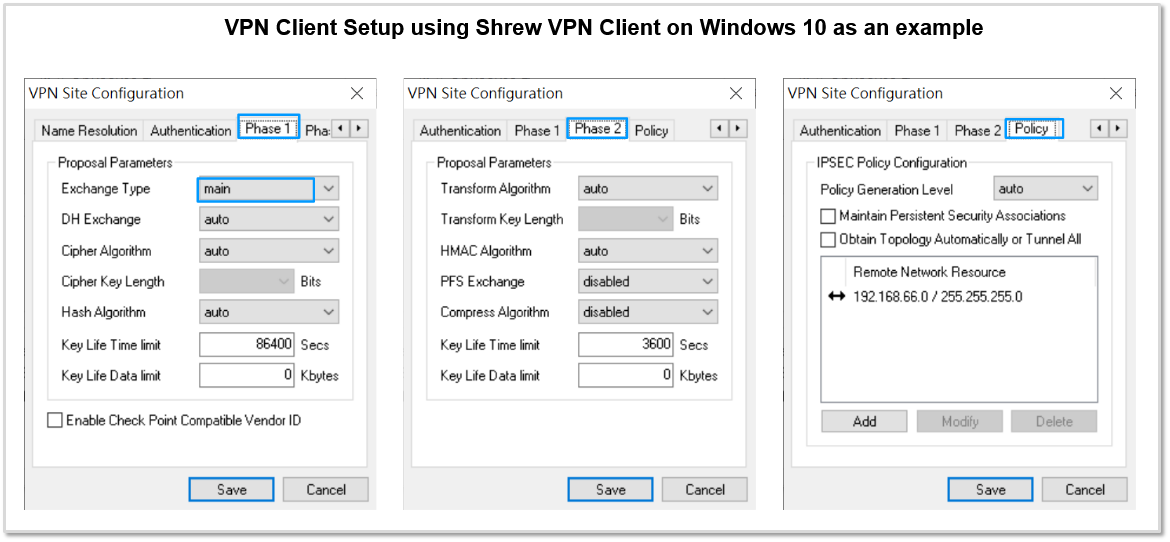
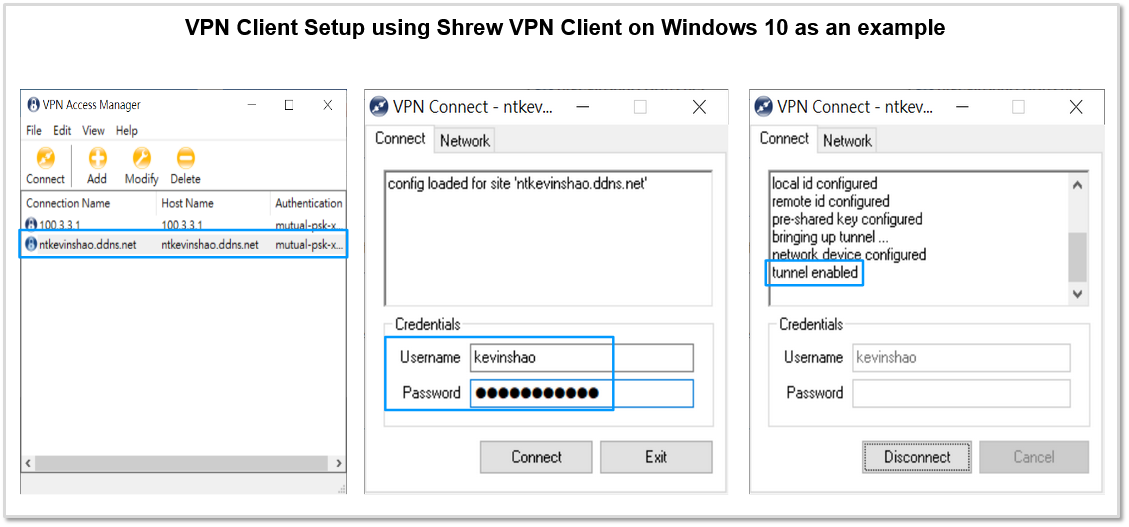
- This is an example of how the Shrew VPN client should be configured on a Windows 10 PC in order to launch a Client VPN connection to ESG.
- The screenshots in this slide and the next slides walk you through the configuration parameters on the Shrew VPN Client.
- Since my ESG WAN IP is not static, I have enabled the DDNS feature on ESG for hostname “ntkevinshao.ddns.net”, so ESG will report to ddns.net DNS server to use its Primary WAN Public IP for ntkevinshao.ddns.net DNS resolution. Therefore, I can input ntkevinshao.ddns.net in the Host Name or IP Address field without having to care what my ESG’s current WAN public IP is.
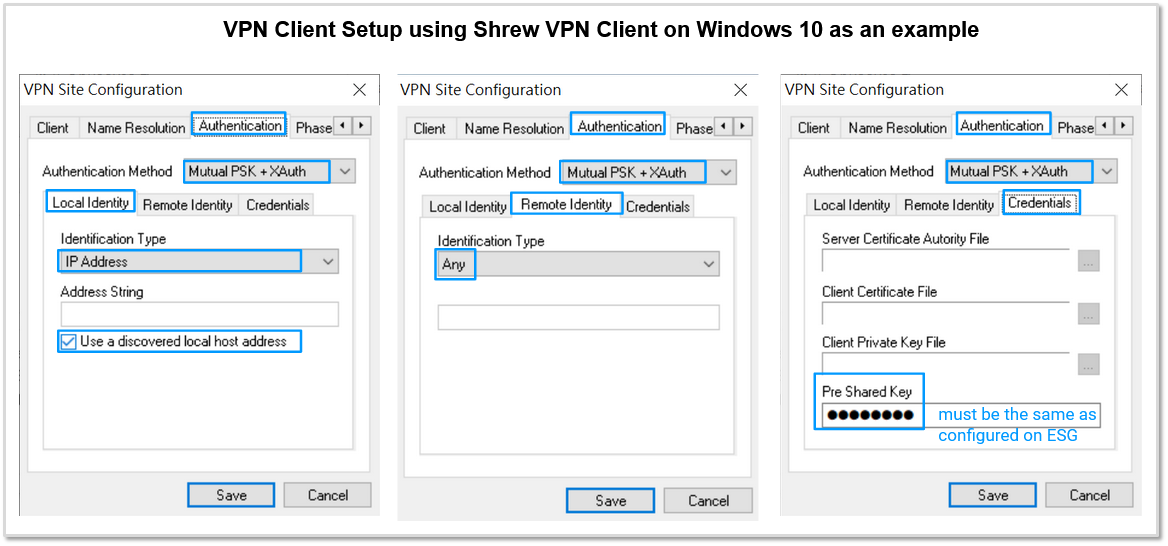
If you uncheck Obtain Topology Automatically or Tunnel All and specify Remote Network Resource manually, then Split Tunneling is used and only traffic with destinations matching the subnet(s) specified in Remote Network Resource are forwarded thru IPsec VPN tunnel.
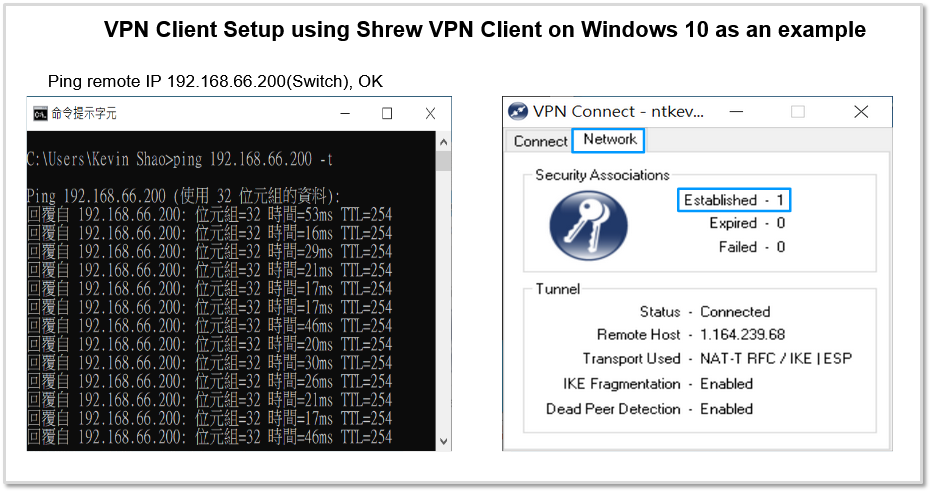
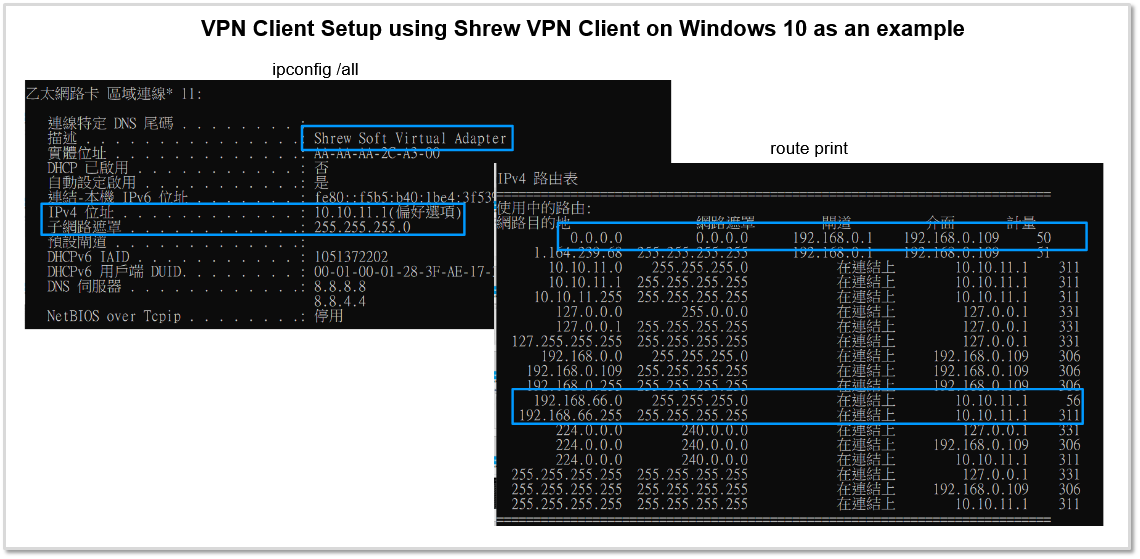
From the screenshot below, you can see client has got a 10.10.11.1 /24 IP address, default route is not changed but a static route to 192.168.66.0 /24 with next hop set to IPsec tunnel 10.10.11.1 is added because we had configured split tunneling in Shrew VPN client.