What good is a 4×4 MIMO Access Point when all my Wi-Fi clients are 2×2 MIMO?

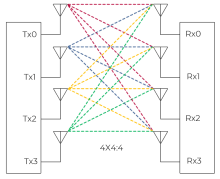
You may have noticed that Wi-Fi 6 802.11ax and Wi-Fi 5 802.11ac Access Points come with multiple radio chains to support MIMO either 2×2 3×3 4×4 or even 8×8. Simply put MIMO adds more capacity without using more spectrum. Each radio chain will increase speed but the client and AP must match to take advantage of this.

However most clients like smartphones, tablets and laptops only support 2×2 MIMO to save power. So what is the advantage of those extra antenna / radio chains?

If there is a mismatch in MIMO levels between the client and AP the antennas do not go unused, but are used for ‘diversity’ and ‘beamforming’, which extends range, and improves speed at range.

So a AP with more radio chains is better for all types of clients and usually has more memory and CPU allowing the AP to manage more connections faster.

Check out the EWS377AP it supports Wi-Fi 6 and has 4×4 radio chains https://www.keenansystems.com/store/catalog/product_info.php?products_id=564

Do you need multi-gigabit switches to deploy Wi-Fi 6 access points?

Today, most business and enterprise-class switches have one-gigabit access ports and there are not many multi gigabit switches yet on the market. The ruckus ICX7150-C10ZP-2X10GR is a compact switch that can support 1/2.5/5 and 10Gb and also the new PoH power standard with up to 90W per port.

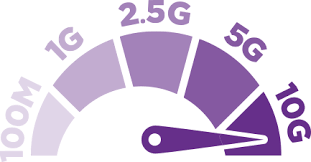
A 802.11ax (Wi-Fi 6) AP has the potential of more than one-gigabit throughput. Therefore, a 1 GbE access port could now possibly be the bottleneck to performance for Wi-Fi users. So many of the Wi-Fi 6 AP’s released will support up 2.5 Gbit/s using the multi gigabit ethernet standard NBASE-T / 2.5GBASE-T. Basically you can use the same Cat 5e or Cat6 ethernet cabling at higher speeds up to 100 meters.

All Wi-Fi 6 AP’s will fall back to standard 1Gbit/s and usually feature a second 1Gb only port. There are not many Wi-Fi 6 clients out in the world at this point so saturating a 1Gb port would be very difficult with legacy clients. There is no issue with deploying Wi-Fi 6 AP’s using your current gigabit switches and then plan to upgrade to multi-gigabit at a later time.

One other thing to plan for is PoE most Wi-Fi 6 AP’s require full power 802.3at or PoE+ like the engenius EWS377AP and ruckus R750 . There are a few like the engenius EWS357AP that only need half power 802.3af PoE. And some like the ruckus R730 ultra high density AP need PoH for full 8×8 stream function but will fall back to 4×4 streams with PoE+ power.

Ruckus Wireless releases the R750 a mainstream Wi-Fi 6 Access Point for ultra dense client situations.

Ruckus has just release their second Wi-Fi 6 Access Point the R750.

It is a 4×4 11ax AP with built in radios for BLE and Zigbee. The R750 has dual ethernet ports one supports 1 / 2.5GbE and the secondary secondary 1GbE. The R750 only requires 802.3at PoE+ for full 4 stream operation so you can leverage your current switches.

Click here for more information on the R750

https://www.keenansystems.com/store/catalog/product_info.php?products_id=570

EWS377AP a 4×4 high performance Wi-Fi 6 AP from EnGenius

With the release of the EWS377AP EnGenius now has a high performance Wi-Fi 6 (802.11ax) AP for business networks. The EWS377AP has 4 streams supports 1 and 2.5GbE and only requires a 802.3at PoE+ injector or switch for power. You can configure them stand alone or in a managed network with a EWS switch or ezmaster.

More information here

https://www.keenansystems.com/store/catalog/product_info.php?products_id=564

OFDMA how it makes Wi-Fi 6 Faster and Better

OFDMA is all about using the Wi-Fi 6 Access Points radio in the most efficient way when supporting multiple clients. MU-OFDMA  is the key technology for (802.11ax) / Wi-Fi 6. MU-OFDMA allows the Access Point to talk to multiple client devices at the same time on both the upload and the download!

Click here to see our in stock Wi-Fi 6 Access Points https://www.keenansystems.com/store/catalog/advanced_search_result.php?keywords=Wi-Fi+6